
 Overview and Quick Start
RuleGo-Server (opens new window) is an application development platform built on the RuleGo (opens new window) rule engine core, providing out-of-the-box RESTful API, visual editor, multi-tenant management, and AI Agent capabilities.
# Positioning and Role
The RuleGo core library is a Go rule engine responsible for parsing, loading, and executing rule chains. RuleGo-Server wraps a complete application-layer capability on top of it:
| Layer | Component | Responsibility |
|---|---|---|
| Core Engine | RuleGo | Rule chain DSL parsing, node execution, component registration |
| Application Platform | RuleGo-Server | REST API, user authentication, multi-tenant, persistence, MCP service, visual editor |
Typical Use Cases:
- Run as a standalone server, manage and execute rule chains via API
- Embed into existing Go web frameworks (Gin/Echo) to provide rule engine capabilities
- Serve as an AI Agent platform, allowing AI tools to manage rule chains via the MCP protocol
- Build IoT gateways, data processing pipelines, API orchestration, ETL workflows, and more
# Features
- Lightweight: Small memory footprint, high performance, easy deployment, out-of-the-box, no database required
- Rich Components: 100+ built-in components covering AI, CI/CD, ETL, IoT, databases, message queues, and more
- Visual Editing: Built-in RuleGo-Editor with drag-and-drop rule chain editing and debugging
- Zero-Code Deployment: Load rule chain DSL files directly and run without writing any code
- Component-Based: Compile on demand, load on demand, support dynamic installation from the component marketplace
- Hot Reload: Rule chains support hot reload; changes take effect immediately
- Multi-Tenant: Each user has an independent workspace, rule engine pool, and component configuration
- AI Native: Built-in AI Agent, supports LLM components, MCP protocol, and Skill management
- Embeddable: Embed into Go web frameworks like Gin/Echo via Bridge mode
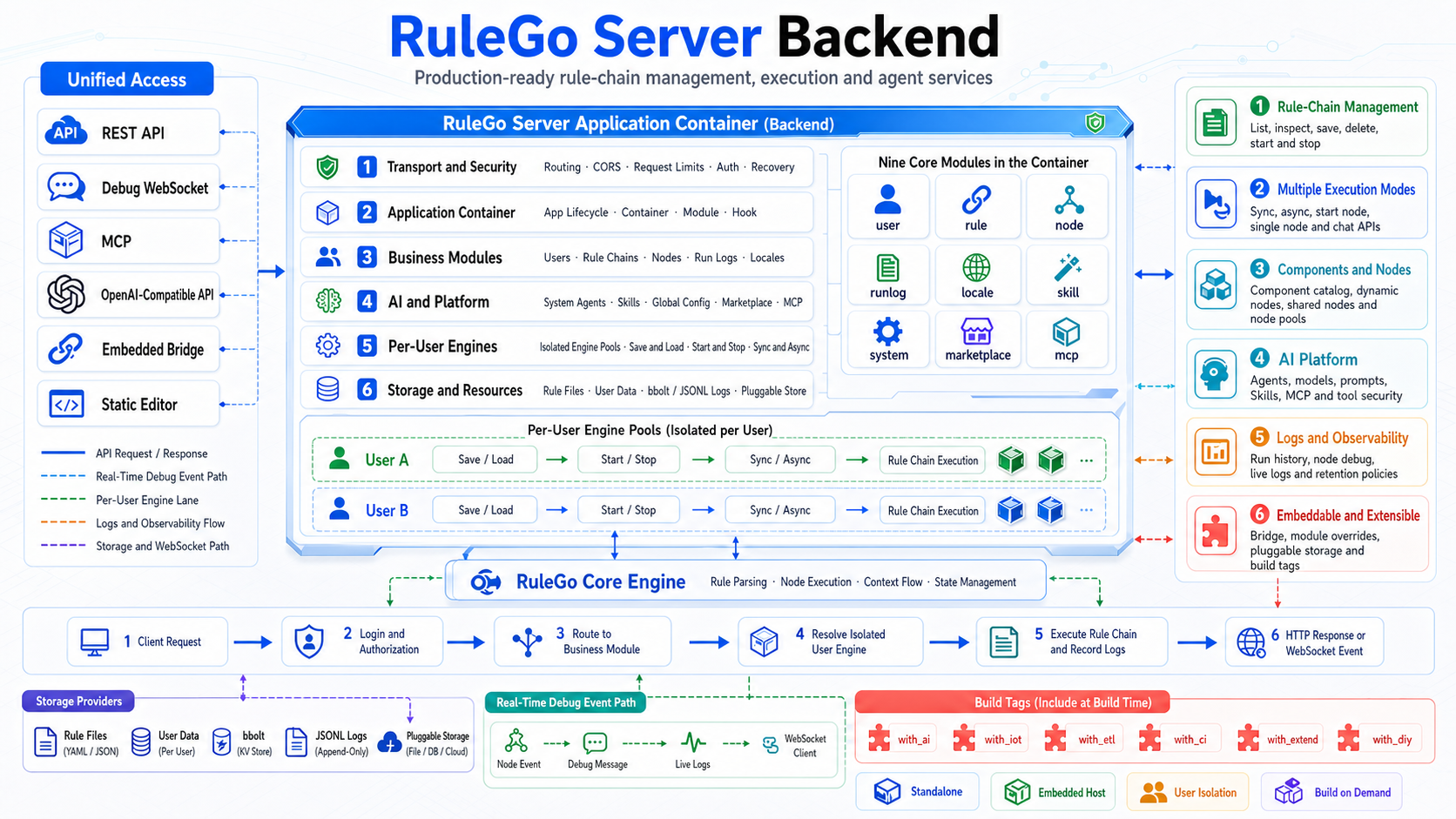
# Architecture
# Quick Start
# 1. Download
Download the binary file for your platform from Github Releases (opens new window).
Other versions can be compiled from the repository: Source Code (opens new window)
# 2. Start
./server -c="./config.conf"
Start in background:
nohup ./server -c="./config.conf" >> console.log &
After successful startup, the console outputs:
RuleGo-Server started on :9090
# 3. Access the Editor
Open http://localhost:9090/editor/ (opens new window) in your browser to use the visual editor.
# Documentation Navigation
| Topic | Description |
|---|---|
| Installation and Deployment | Configuration file details, Docker deployment, build tags |
| Authentication and Authorization | JWT, API Key, permission system |
| REST API Reference | Rule chain management, execution debugging, component management, full API |
| MCP Service | MCP configuration, tool list, group control, custom MCP endpoints |
| AI Features | AI Agent, Skill, MCP integration with AI programming tools |
| Component Marketplace | Browse and install components/rule chain templates |
| Run Logs | Log storage, querying, cleanup |
| Internationalization | Language pack management |
| Custom Development | Module system, DI, custom storage, embedded mode |
| Deploying and Invoking Rule Chains | File-based and API deployment for third-party integration |
# Visual Editor
| Topic | Description |
|---|---|
| Visual Editor | Editor features, canvas operations |
| AI Assistant Tutorial | Create/modify rule chains via AI conversation |
| Debugging Rule Chains | Debug console, single-node debugging, execution history |
| Creating an Agent Tutorial | Visually create agents and call them via API |
# Ecosystem: GFlow Approval Workflow
GFlow Approval Workflow (opens new window) is an enterprise approval workflow platform built on RuleGo: approve, then automate — AI reviews first, humans sign next, and actions execute automatically once signed. Approvals and automation live in the same process DSL: the automation node invokes rule chains to run business actions, and the aiAgent node invokes agents to assist approval, bringing RuleGo's orchestration capabilities straight into approval scenarios.
Try it online: gflow.rulego.cc (opens new window)